Русский
Инструменты
база данных
Часто задаваемые вопросы
"No JVM could be found..." error when I try to launch Magelo Sync


Magelo Sync is working on Java 7 or better.
When you launch Magelo Sync, the following error message indicates there's a problem with your Java installation.
What should you do?
If you have Windows 64 bit: Make sure you have Java 7 or 8 in 64-bit installed on your computer.
If you have Windows 32 bit: Make sure you have Java 7 or 8 in 32-bit installed on your computer.
Java actually recommend to install both Java 32-bit and 64-bit on your computer to avoid any issue.
Magelo Sync should then work fine after you installed Java properly.
Here's a screenshot of a control panel, highlighting Java 8 installed in 32-bit and 64-bit.
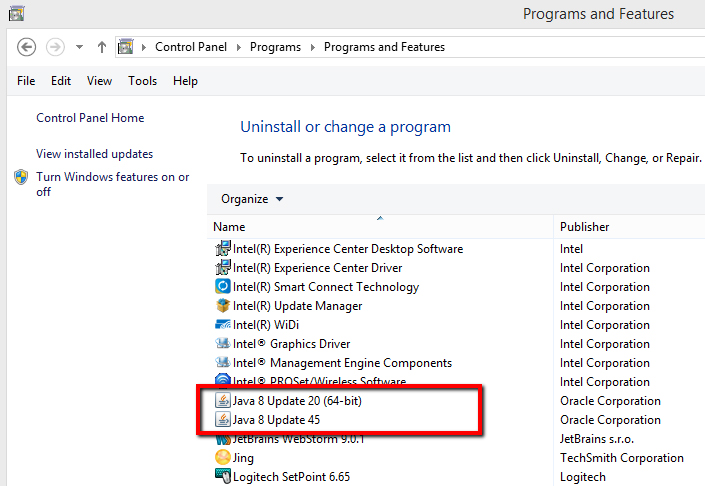
Finally, we also recommend you to make sure you don't have previous versions of Java installed on your computer, like Java 6 for exemple. That can create a conflict. So make sure you just have Java 7 or 8 in 32-bit or/and 64-bit installed.
If Magelo Sync is still not working after you installed Java properly, please open a topic in the Bugs forum explaining your problem.

When you launch Magelo Sync, the following error message indicates there's a problem with your Java installation.
No JVM could be found on your system.
Please define EXE4J_JAVA_HOME
What should you do?
If you have Windows 64 bit: Make sure you have Java 7 or 8 in 64-bit installed on your computer.
- Simply go to your "Control panel > Programs and features". You should see "Java 7/8 Update xx (64-bit)" listed.
- If not, go to the Java website and download "Windows Offline (64-bit)". Here's a link to the download page: http://www.java.com/en/download/manual.jsp
If you have Windows 32 bit: Make sure you have Java 7 or 8 in 32-bit installed on your computer.
- Simply go to your "Control panel > Programs and features". You should see "Java 7/8 Update xx" listed.
- If not, go to the Java website and download "Windows Offline". Here's a link to the download page: http://www.java.com/en/download/manual.jsp
Java actually recommend to install both Java 32-bit and 64-bit on your computer to avoid any issue.
Magelo Sync should then work fine after you installed Java properly.
Here's a screenshot of a control panel, highlighting Java 8 installed in 32-bit and 64-bit.
Finally, we also recommend you to make sure you don't have previous versions of Java installed on your computer, like Java 6 for exemple. That can create a conflict. So make sure you just have Java 7 or 8 in 32-bit or/and 64-bit installed.
If Magelo Sync is still not working after you installed Java properly, please open a topic in the Bugs forum explaining your problem.
 Отправлено loulina, 14 июл. 2011 г., 5:28:38 - Просмотров:19238